BoxerBase
Referees and judges#
The referees area has four tabs: build the official roster in List, distribute officials to rings in Assignment, schedule match-by-match placements in Ring, and review quality and workload in Stats.
Workflow#
- Add officials in List and set their class-type roles.
- Assign officials to each ring for every timeslot in Plan → Assignment.
- Set the draw rules once for the whole event, and per session where needed.
- Open each ring in Plan → Ring and draw the officials.
- Manually adjust conflicts, absences, and last-minute changes.
- If the event has a draw commissioner, print the draw commissioner sheet for the ring. Most events can skip this.
- Review distribution and quality in Stats.
List tab#
Build your event referee roster here.

- Add referees and judges with name, organization, and country.
- Set role permissions per class type:
Referee,Judge, or both. - Edit values inline by double-clicking.
- Remove officials from the event. Removal is soft, so you can restore them.
- Set per-referee conflict of interest (COI) against organizations or specific boxers.
- Paste bulk lists or CSV. Role hints like
R,J, andR/Jare supported.
Example CSV you can paste into the first name field:
Anna,Svensson,SWE,R/J
Marco,Rossi,ITA,J
Elin,Andersson,GBR,R
Plan tab#
The plan tab has two modes: assignment (timeslot level) and ring (match level).
Assignment mode#
- Distribute officials between
Unassignedand each ring. - Move officials with arrows or the context menu.
- Use
ResetandRandomwhen needed. - Save assignments per timeslot.
Ring mode#
Plan exact placements for each match. Open the ⋮ menu next to Judges for the ring actions:
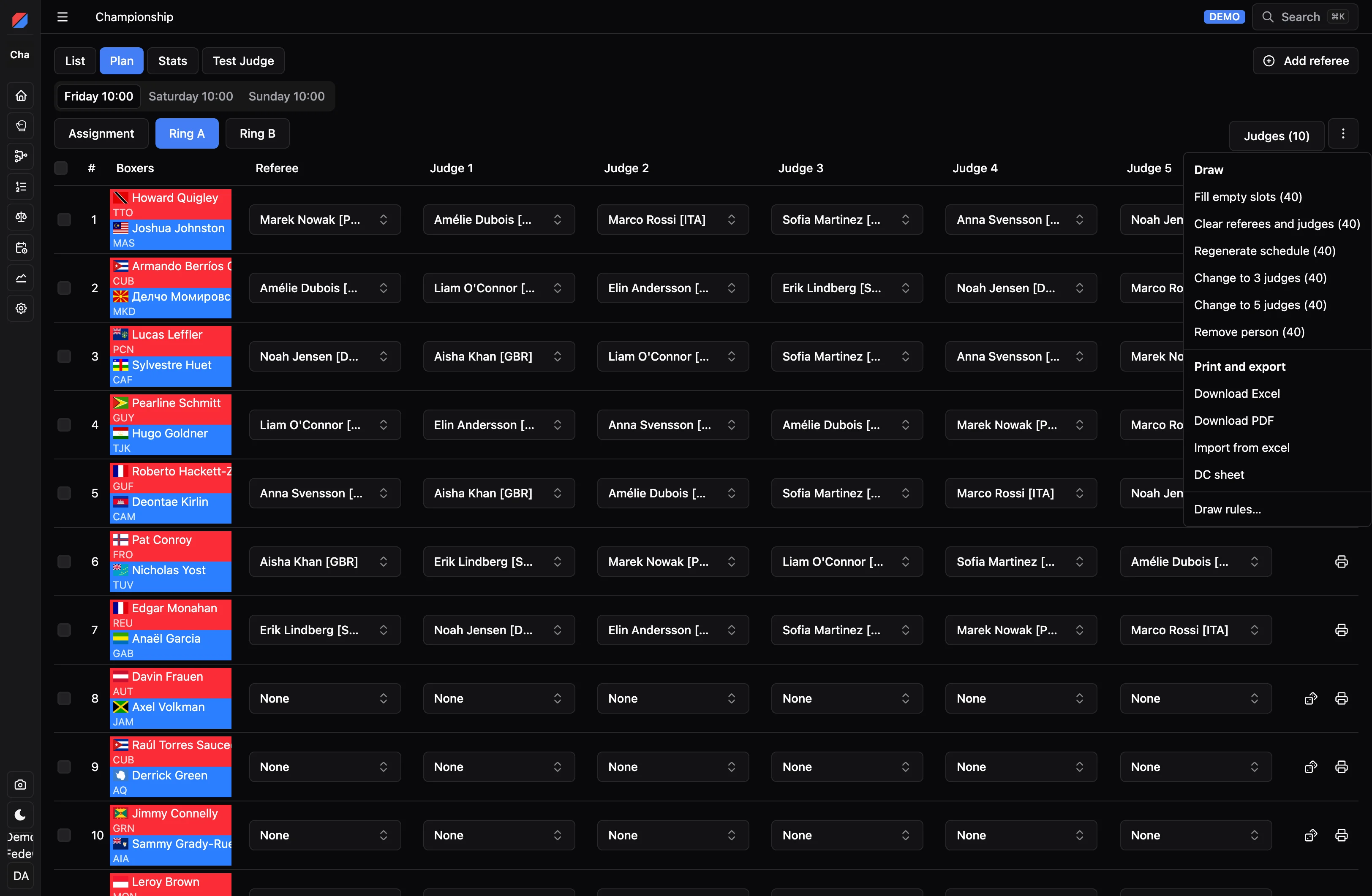
- Fill empty slots draws officials only into empty seats. Regenerate schedule clears the officials in scope first and draws again. Both follow the draw rules.
- Scope actions to selected matches. Shift-select is supported.
- Change between 3 and 5 judges where class rules allow.
- Clear all assignments in scope.
- Remove one person from all matches in scope.
- Export and import Excel plans.
- Open Draw rules… and the DC sheet (the draw commissioner sheet).
Each row also has its own buttons at the end:
- The dice draws officials for that bout alone. It shows while the bout has no referee or judges and has not finished, so you can draw bout by bout as the session runs.
- The printer opens the bout sheet for that match, with scores once there are any.
Draws of real bouts run on the server and are recorded in the draw log.
When a draw leaves seats empty, you get one of two warnings:
- Not enough eligible officials in this ring: nobody left could sit there at all, for example because the ring has too few officials, or none licensed for that class. Assign more officials to the ring.
- Could not be filled without breaking a required rule: someone could sit there, but only by breaking a rule set to Require. Fill the seat by hand, or change the rule to Prefer.
Judges timeline#
The timeline view speeds up manual editing across many matches. Rows are judges and referees; columns are matches. Each cell shows:
R: referee in ring (placement0)1toN: judge placementT: timekeeper, when timekeepers are drawn from the ring’s officials- Empty or gray: break, not assigned
Click a cell to select it, then use these shortcuts:
Ror0: set referee placementT: set timekeeper1to5: set judge placement, within the allowed judge count for that matchBackspace: remove that person from the match- Arrow keys: move between cells
EnterorTab: move to the next matchCtrl/Cmd + Z: undo;Ctrl/Cmd + Shift + Z: redo
Changes stay local until you press Save in the timeline panel.
Conflict colors#
Conflicts are color-coded with strict priority, so only the highest-priority color shows when several apply:
- Red: COI conflict, highest priority
- Orange: same organization
- Yellow: same country, lowest priority
Avoiding officials from the boxers’ countries is a draw rule.
Draw rules#
Draw rules decide who may be drawn where. Open them from Draw rules… in the ring menu. Rules on Whole event apply to every session. To use different rules in one session, open This session and turn on Use different rules for this session.
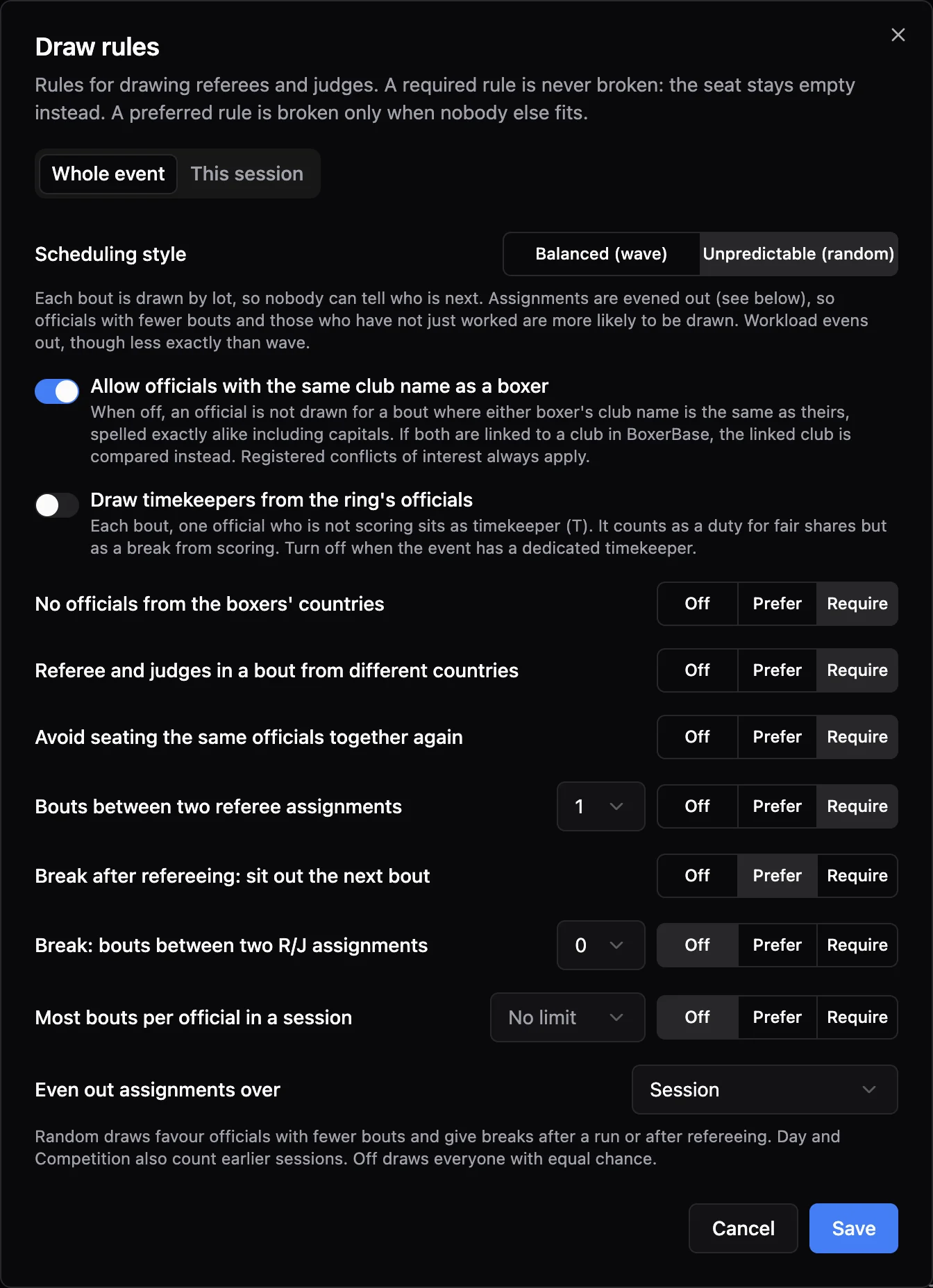
Most rules have three strengths:
- Off: the rule is not used.
- Prefer: broken only when nobody else fits the seat.
- Require: never broken. The seat stays empty instead.
Scheduling style#
- Balanced (wave) rotates officials in a steady pattern. Everyone gets about the same number of bouts, the referee seat is shared out, and breaks come at regular intervals. It is easy to follow, but the next bout’s officials can often be guessed.
- Unpredictable (random) draws each bout by lot, so nobody can tell who is next. How fair it is depends on Even out assignments over. When that is set, officials with fewer bouts and those who have not just worked are more likely to be drawn. When it is Off (pure lottery), everyone eligible has the same chance every bout, so workload can end up uneven.
Rules#
| Rule | What it does |
|---|---|
| Allow officials with the same club name as a boxer | When off, an official is not drawn for a bout where either boxer’s club name is the same as theirs. Names must be spelled exactly alike, including capitals. If both are linked to a club in BoxerBase, the linked club is compared instead. Conflicts of interest always apply. |
| Draw timekeepers from the ring’s officials | Each bout, one official who is not scoring sits as timekeeper (T). It counts as a duty for fair shares, but as a break from scoring. Turn it off when the event has a dedicated timekeeper. |
| No officials from the boxers’ countries | Keeps officials from the same country as either boxer out of the bout. |
| Referee and judges in a bout from different countries | No two scoring officials in a bout from the same country. |
| Avoid seating the same officials together again | Mixes up who works together across the session. |
| Bouts between two referee assignments | The fewest bouts between two times an official referees. |
| Break after refereeing | The referee sits out the next bout. Timekeeping counts as a break. |
| Break: bouts between two R/J assignments | The fewest bouts an official rests between two scoring assignments. |
| Most bouts per official in a session | A cap on scoring assignments per official, counting all rings in the session. |
| Even out assignments over | Evens out workload over the Session, Day, or whole Competition. Wave always balances the session, so it has no Off option. Day and Competition also count earlier sessions. |
In Balanced (wave), four of these are not offered and never apply: Avoid seating the same officials together again, Break after refereeing, Break: bouts between two R/J assignments, and Most bouts per official in a session. The wave pattern already decides how long officials work, when they rest and who works together, and it always prefers to rest the referee after their bout. Values saved for these rules are kept and come back when you switch to Unpredictable (random).
Draw log and commissioner sheet#
Every change to a ring’s officials is recorded in the draw log with who made it and when: random draws, draws of selected bouts and manual changes. Log entries are never edited afterwards.
The Draw commissioner sheet is a printable PDF for one ring in one session. It has:
- The referee and judges pool, with each official’s bouts in this session and over the whole event.
- Every bout with its referee and judges. A small number next to a seat points to the log entry that set it, when it was not set by a full random draw.
- The draw log. Random draws show how many bouts changed and the rules they ran under, in one short line. Rules are only repeated when they change. Entries later fully replaced are greyed out.
- Space for notes and signatures by the IF delegate and the draw commissioner.
Draw Commissioner role#
Give someone the Draw Commissioner permission in Settings → Officials to let them manage referees and judges without full event access. They can:
- Add, edit, and remove officials, and set conflicts of interest.
- Assign officials to rings and draw or change placements.
- Set the draw rules and print the draw commissioner sheet.
- Print bout sheets. Scores stay hidden until the bout is announced, as for the public.
They cannot change other event settings, boxers, or results.
Conflict of interest#
Conflict of interest lets you mark matchups a referee should avoid. Conflicts are used by planning and conflict highlighting, and treated as the most severe conflict type.
- In List, open the
COIcolumn for the referee. - Add an organization COI to avoid all boxers from that organization, or a boxer COI to avoid one specific boxer.

Stats#
Use stats to review quality and load balancing. Filter by all timeslots or one timeslot, and switch class type when the event has multiple variants. You can search and sort by referee workload, match and round errors, error rate, and time-to-judge (TTJ).
Practical notes#
- Ring scheduling is blocked until officials are assigned to that ring.
- Save as you go when moving between timeslots and rings.
- Set class-type role permissions before drawing.
- Set draw rules before the first draw, so the log shows the rules every draw ran under.